1:20 RC Excavator Toy Truck: 11CH, Lights & Sounds
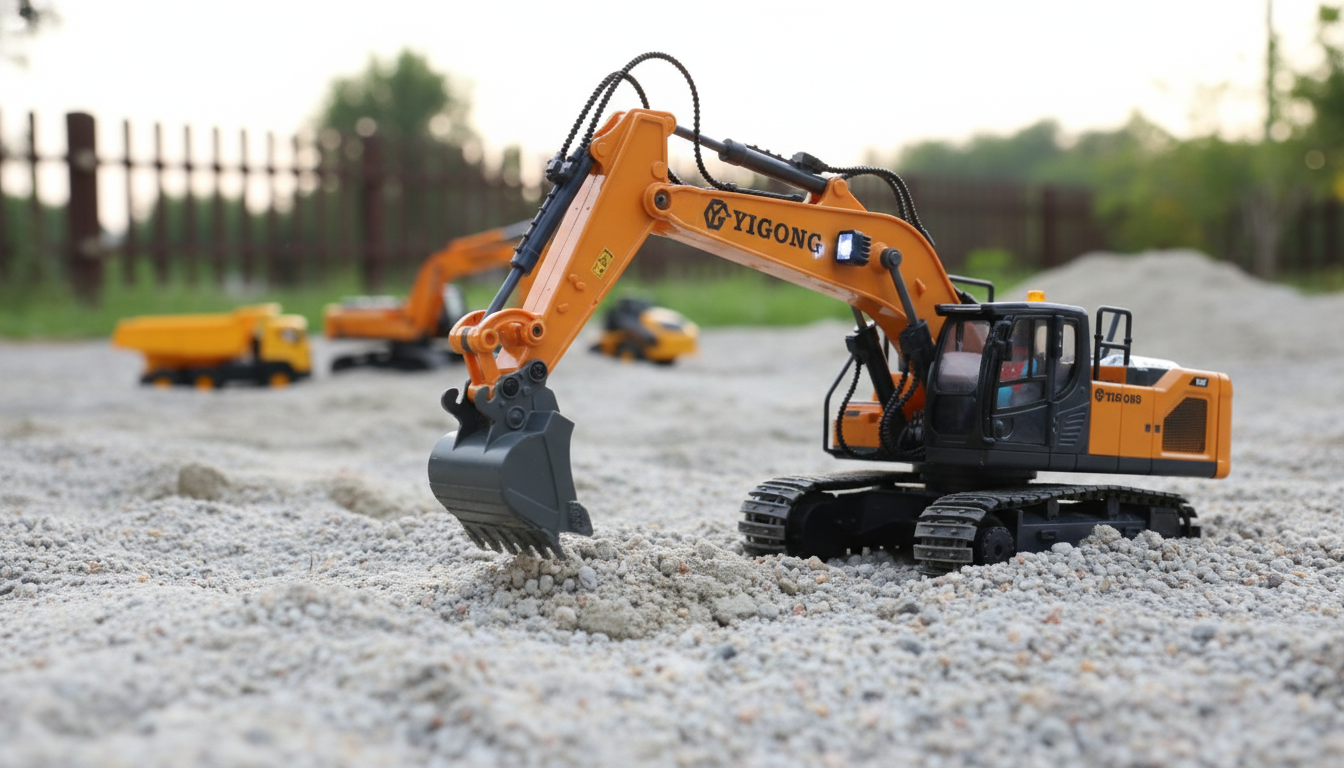
RC Excavator Toy Truck 1:20 Scale 11CH with Remote Control, Lights & Sounds
A 1:20 scale RC excavator toy truck with 11-channel control, working lights, and sound effects turns construction play into something that looks and feels surprisingly true to life. With separate controls for driving, rotating the turret, and articulating the boom, arm, and bucket, kids can practice real “dig, scoop, swing, dump” sequences instead of simply racing around. Below is a practical guide to how 11-channel excavator controls typically work, what to check before buying, and how to set up a fun mini worksite indoors or outside.
What Makes a 1:20 Scale RC Excavator Feel Real
At 1:20 scale, an RC excavator is big enough to show off visible boom and bucket motion, yet still small enough to carry, store on a shelf, and set up in a living room “work zone.” That balance matters because realistic play comes from repeated cycles of loading, repositioning, and dumping—without the toy being too bulky to bring out often.
The “11CH” label usually points to multi-function control. Instead of combining several motions into one button, you get more separate actions: driving, turning, turret rotation, and multiple arm movements. Add lights and sound effects, and the toy gains instant role-play cues that help kids track where the machine is headed and what job it’s doing.
Typical 11-Channel Functions on RC Excavator Toys
| Function | What it Does in Play | Why It Matters |
|---|---|---|
| Forward / Reverse | Drives the tracks/wheels ahead or back | Core navigation and positioning |
| Left / Right Turn | Steers or pivots to change direction | Tight maneuvering in small spaces |
| Turret Rotation (Left/Right) | Spins the upper body | Realistic excavator operation and aiming the bucket |
| Boom Up/Down | Raises or lowers the main arm | Controls reach and digging height |
| Arm In/Out | Extends or retracts the secondary arm | Improves precision when scooping |
| Bucket Curl/Uncurl | Opens/closes the bucket angle | Grabs, lifts, and dumps material |
| Lights On/Off | Activates work lights | Visibility and immersive play |
| Sounds On/Off | Engine/worksite audio effects | Adds realism; can be toggled for quieter play |
Features to Check Before Buying
Two RC excavators can look similar online, yet feel very different in real play. A few checkpoints help separate a “cool-looking” model from one that holds up to repeated digging and dumping.
- Control range and responsiveness: Look for smooth response when starting, stopping, and rotating. Better control makes it easier to scoop without spilling and to line up the bucket over a “dump truck” target.
- Materials and durability: Arm joints, the bucket linkage, and the turret gear area take the most stress. These areas should feel snug rather than wobbly, and the chassis should stay stable during lifting.
- Battery and charging clarity: Choose a model with clear charging steps, a protected battery compartment, and a run time that supports a full play session without constant interruptions.
- Independent sound and light controls: A separate on/off option is ideal for indoor play, shared spaces, and quiet time.
- Age suitability: Match complexity to the child. More channels are more fun, but they can also require patience and coordination. For younger kids, close supervision and simpler “missions” can help.
For general toy safety guidance, it’s worth reviewing the CPSC toy safety resources and age-appropriateness tips from HealthyChildren.org (AAP). Since many RC toys use rechargeable packs, basic handling reminders from UL’s lithium-ion battery safety overview are also helpful.
How to Set Up a Mini Worksite at Home
A good “worksite” makes the excavator feel like a real machine with a real job. The goal is controlled digging that doesn’t overload the bucket or grind debris into moving joints.
- Best surfaces: Low-pile rugs, packed dirt, a sand table, or a shallow sensory bin keep play contained and predictable. A small bin also makes cleanup faster.
- Simple obstacles and zones: Use cardboard ramps, building blocks, or a small box as a “loading dock.” Create a start point, a digging pit, and a dump zone to encourage repeatable routes.
- Material choices: Lightweight fill (dry beans for older kids, kinetic sand, or soft pellets) is easier on the arm joints than heavy rocks. It also helps prevent the bucket from stalling under load.
- Role-play scenarios: Assign tasks like “dig,” “haul,” “dump,” and “level.” Timed challenges (“clear the pit in five dumps”) add structure without turning it into a win/lose game.
Care, Charging, and Storage Tips
A little routine maintenance goes a long way, especially around the parts that move against grit.
Who This RC Excavator Is Great For
Shop In-Stock Picks
- RC Excavator Toy Truck 1:20 Scale 11CH with Remote Control, Lights & Sounds — $60.51
- Large Capacity Y2K Puppy Pencil Case — $6.97
Product Snapshot
FAQ
What does 11-channel control mean on an RC excavator?
“11-channel” typically means the remote can control multiple separate functions rather than only driving and turning. It commonly includes driving, steering, turret rotation, boom/arm/bucket movements, plus toggles like lights and sounds for more realistic operation.
Can an RC excavator toy be used in sand or dirt?
Yes, it can usually handle light digging in dry sand or dirt for play. Brush debris out of joints and moving parts after use, and avoid wet sand or mud unless the model is specifically rated for water resistance.
How can lights and sounds be managed for quieter indoor play?
Look for independent light and sound toggles on the remote or the vehicle so you can turn sounds off while keeping play active. Using softer “dig materials” indoors also helps reduce overall noise.












Leave a comment